craftED
is the blog for The Germantown Academy Professional Development Program.
Showing posts with label ED Tech. Show all posts

Sunday, October 23, 2016

Be in the Know: Guest Blogger, Jim DiFranco

Be in the know @GA

There’s so much going on at GA, it’s almost impossible to keep up! Ever wonder how some colleagues know things before you? Wish you could get a weekend Patriots’ sport update? Or wonder what cool things are happening in other divisions? With other colleagues? Well, here is your starter guide!

*Disclaimer, by no means is this intended to take the place of attending events, cheering on our teams, engaging in conversations, or good ole collegiality.

Blogs:
Subscribe to some of GA’s blogs! We currently have six operational blogs utilizing Blogger. In order to “subscribe” to a blog once you’ve found one you’re interested in, scroll down and locate the “follow by Email” box. From here, fill in your email and click “submit.” When that particular blog gets updated with a new post, you’ll get an email and a link!  


To follow GA’s professional development, subscribe here:


To follow all the happenings around GA’s green spaces, subscribe here: http://gagreen.blogspot.com/


To follow Art Across the Academy (A3), subscribe here:


To keep current on all the innovative things happening at GA, subscribe here: 


See GA from a student’s perspective and subscribe here: http://gapatchat.blogspot.com/


Twitter:
If you haven’t already, consider getting started with Twitter. To follow someone or something click on the “Follow” button once you’ve found what (or who) interests you. Here are some GA Twitter addresses to consider:

   Follow                    Twitter Handle
GA
Lower School
Middle School
Upper School
GA Sports
GA Arts
Follow me!


Instagram: If you’re on Instagram:
 Follow GA: Germantown Academy


Facebook: Do I even need to say anything on this one?
 Like GA: Germantown Academy

The New Community Project:
Learn more about one of GA’s innovative US classes:
http://www.thenewcomproject.org/


Good Luck!

Monday, June 6, 2016

20 Time in the History Classroom


20 Time in the History Classroom

Early Stages
In recent years, students in my 7th grade social studies classes have engaged in a 20 Time project. Initially, students may question how this “fits” into traditional work they’re accustom to, but with introducing basic parameters and general rules, students can quickly begin to see the concrete components for which they are responsible for, balanced with the freedom to experiment and personalize the content of the unit. During my first year, piloting the project in just my own classes, students had complete control over their topic, and the products reflected that freedom with a diverse range of projects. In the second year, when the project was implemented across the entire 7th grade, an additional “content anchor” was added to ground the project in US history. This move added a level of rigor and challenge to the assignment.

The Pitch


After a few weeks, students have developed projects with a goal, found basic background information, thought about how their final product will benefit the greater community, and have reached their first milestone, Pitch Day. To support their brief, elevator speech-style presentations, students create a Pitch Day Cover Sheet with basic information about themselves as well as providing access to their initial project blog postings. Guests at Pitch Day are provided specific forms to provide qualitative feedback to the students regarding their presentation skills and critique of their project, including identifying pitfalls and offering strategies for success.

The 3 R’s: Reflection, Research, and Revision


Students next take their Pitch Day feedback and begin the process of Impact mapping. During this refinement phase, students begin brainstorming who, what, how, where, when, and why their work as so far envisioned will be of importance, and then identify gaps and next steps to research. At its core, this is an empathy activity, and one meant for students to critically reflect upon their work up to this point.
This is also the point at which my school librarian becomes an important ally, as the focus shifts to more traditional research skills where students are presented with explicit lessons using the Big 6 framework. In addition to demonstrating the cyclical nature of research, students develop refined skills such as keywording, generating secondary questions, managing research databases, and documenting resources. Through impact mapping and more targeted research, students are able to further develop and advance their projects.


The Presentation


After several months of regular work, students complete their final products and spend time reflecting in writing on their journey before an afternoon and evening of presentations to a public audience of teachers and parents that is broken into two parts: an open, tri-fold gallery-style presentation and the more intimate, TED-style talks. Both presentation media focus upon the content of the research and the product that was created, the successes the students achieved during the unit, the challenges they contended with, and what we’ve come to call the “learning curve,” the ultimate lessons that the students learned that can be applied not just to research and this class, but to their journeys as learners overall. This culminating experience is especially important as the students are speaking as experts to a critical, though supportive, audience.


Takeaways 

The main objectives to piloting 20 Time were to complement traditional curriculum with autonomous student learning, exploring a personal passion project, and repeated, effective communication and collaboration with peers and a public audience. Having finished two years of piloting, the takeaways are: First, innovative thinking can be uncomfortable for all stakeholders as teachers have to give up an increased sense of control within the classroom and students struggle with the uncertainty and magnitude of a large, decentralized project. Second, identifying what you need to know and asking the right questions to find that information can be difficult. In our digital, instant-access world, students have become too accustomed to finding information immediately, and working to break down a complicated problem and tackle its component parts is often a foreign experience. Third, passion builds student engagement because they are personally invested in their work as they felt their ideas were honored and magnified in ways that they had not been previously.

Wednesday, May 25, 2016

What is This Thing Called 20 Time? Guest Blogger: David Baroody


Overview

Passion-based research goes by many different names; 20 Time and Genius Hour are just two different terms that describe projects that center upon personal inquiry and ideas to spark innovation. Based on a framework employed by such innovative companies as Google, GE, Skype, and Apple, employees are encouraged to spend 20 percent of their time to develop, research, design, test, and refine a project or idea of their own. When applied within the classroom, this approach is meant to increase student engagement, independence, and responsibility, while allowing the teacher to model research and design skills, to provide an environment of entrepreneurship, and to give students access to feedback from authentic, real world audiences.


20 Time and the Classroom

Students can be initially skeptical of the pedagogical change embodied by student-centered, abstract learning. To aid buy-in among students so they understand how this new learning will successfully impact them, videos such as Daniel Pink’s Drive, Sir Ken Robinson’s Changing Education Paradigms, The Golden Circle, and Why We Make Bad Decisions highlight the importance of trying and failing in developing a growth mindset as a 21st century skill.


In addition to understanding the “why” of 20 time, it’s important for students to become familiar with basic parameters so they can see how the concrete components for which they are responsible are balanced against the freedom to experiment and personalize their work. The actual process involves students selecting a topic about which they are passionate, conducting initial research to craft a proposal or “pitch” for their idea, then further researching, designing, and implementing a product that showcases their learning and understanding.

For many, this may be the first time they’ve ever experienced a broad level of abstraction, and also given organizational control for such a broad and long-term project. As a result, there are a variety of structured mechanisms for teachers to support students along the way, including a basic brainstorming guide, blog feedback, impact mapping, and librarian assistance to aid research skills and strategies. After cycles of researching, feedback, reflecting, and design iterations, students can then share their work to the community in many ways, including digital platforms or TED-style presentations.

Tuesday, May 10, 2016

ExCamp a Big Hit!


GA’s first EXCamp was a rousing success.  On the afternoon of May 2, 2016, approximately one hundred teachers attended fourteen different workshops designed and facilitated by colleagues across a wide range of topics.   Inspired by the favorable response to this kind of peer to peer professional development, the Professional Development Task Force will recommend to the Heads of Schools that we plan another series of these workshops on an In-Service Day next year.

Because many teachers were coaching and, therefore, unable to attend the event, we are making available the materials used in some of the workshops.  Many thanks to the presenters for so generously sharing their work with their colleagues.  Click here for access to the handouts and powerpoint presentations.

Please take a moment to provide some feedback on the event.


The Professional Development Task Force


Sunday, May 8, 2016

Flipping My Classroom: Guest Blogger Rebecca Burnett


Sometimes, my kids get sick.  Sometimes, it snows.  Sometimes, half my class is missing for an away game last period.  In each of these situations, I have found it’s hugely helpful to have some digital content in my back pocket so that students can still have a useful class experience, even when we’re not in the same room together.  Because the curriculum keeps advancing and students can work through this part of it independently, I am able to spend the quality time we do have together discussing at the Harkness table.  The VLE affords me a great opportunity to do something productive with the students while we are apart, enabling our time together to be as effective as possible.  

My favorite way to flip the classroom is to use SMART recorder to record an opening lecture for a unit or some other form of video lesson.  This year, when it snowed just as we were about to start A Midsummer Night’s Dream in English 9, I was able to buy back valuable instruction time by recording my introduction to Shakespeare using SMART recorder, uploading it to youtube, and embedding that lecture on the VLE.  For homework, the students watched the lecture, which meant we could read Shakespeare together in class.  Rather than asking students to muddle through the first scene of the play on their own, I was able to provide hands on assistance as they worked through the text in the classroom.  Delivering the lecture through the VLE bought me that time.  It also allowed students to go back and check parts of the lecture when they had questions.  While this method was a happy accident this year, I plan to always deliver the lecture virtually in the future.  

I also once used the online discussion tool on the VLE to allow AP students to lead class discussions in which I could participate when I was away at a conference.  I set aside our regular class time for students to read the novel, and then asked students to check into a digital discussion within a 6 hour window that evening.  Students needed to post a minimum of one comment, but they wound up really engaging each other in dialogue, checking back several times over the course of the evening to see what others had said and respond.  I was able to be online from my hotel in Boston and participate with the students in real time.  While I definitely prefer to have these conversations in person and during the school day, as I prefer face-to-face interaction and am mindful of my students’ time in the evenings, in this instance, the VLE enabled me to remain connected to my students from another state.   

Thursday, April 28, 2016

Empowering Students to Create and Share Content: Guest Blogger Rebecca Burnett


As we embark on school-wide conversations about differentiated assessment and digital literacy and citizenship, the VLE can provide an organic, subject-specific way to put those initiatives into practice.  

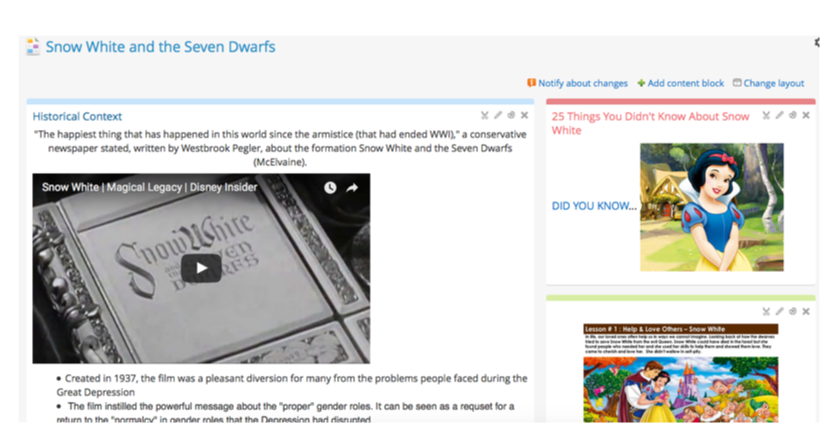
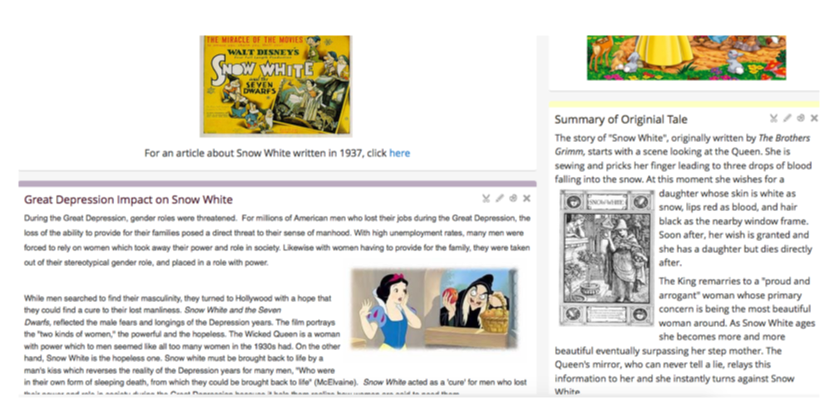
In several of my upper level and AP classes, I have asked students to do research on a relevant topic.  While I used to have to devote several class periods to monotonous Power Point presentations, I now ask students to develop VLE pages as a way to share the information they have found with their classmates.  As students develop these pages, I ask them to keep their audience in mind.  How much content would a reader want?  How might the reader be visually engaged by the page?  What is the optimum way to present/deliver content?  In effect, students become web designers, but the VLE enables them to build pages without having to know how to code.  As students develop their own multimodal texts, they think about the needs of a reader; thus, they develop both multimodal literacy and empathy at the same time.  Here is a sample of a student page providing background information on Disney’s Snow White and the Seven Dwarfs, a text students analyze in Fairy Tales:
 
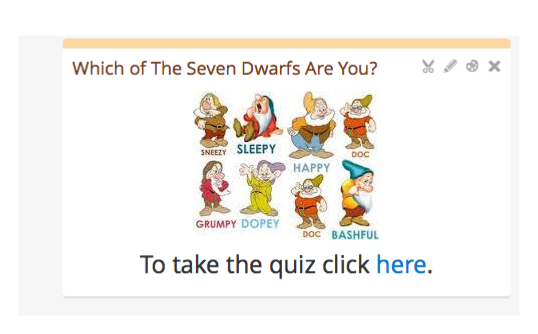
Because students are so comfortable in an online setting, they can also find ways to intersperse playful touches with the academic material.  For instance, this page included a Buzzfeed quiz:

Because students developed these resources themselves, they were more invested in the research.  Their classmates consumed the pages with pleasure, digesting more information than I could ever have hoped to deliver to them in a lecture on a similar topic.  Because the pages allow for elegant and streamlined delivery of large amounts of material in a short time, they can be browsed at home or in class and still leave me with more class time than I used to have when students did research presentations.  

I also used the VLE to create a digital assignment sheet for this project.  Putting the assignment sheet in a “note” enabled me to embed a youtube tutorial right in the assignment sheet:

I have also used the VLE to teach students how to write responsible, informed online comments.  In both Drag Identities and What Women Want, after students peruse a page of content on the VLE, I ask them to “comment” on what they read.  For these comments, I find that the online discussion tool on the VLE is the most useful platform, because it allows students to start new threads of discussion, to post original responses, and to reply to their classmates’ comments, directly.

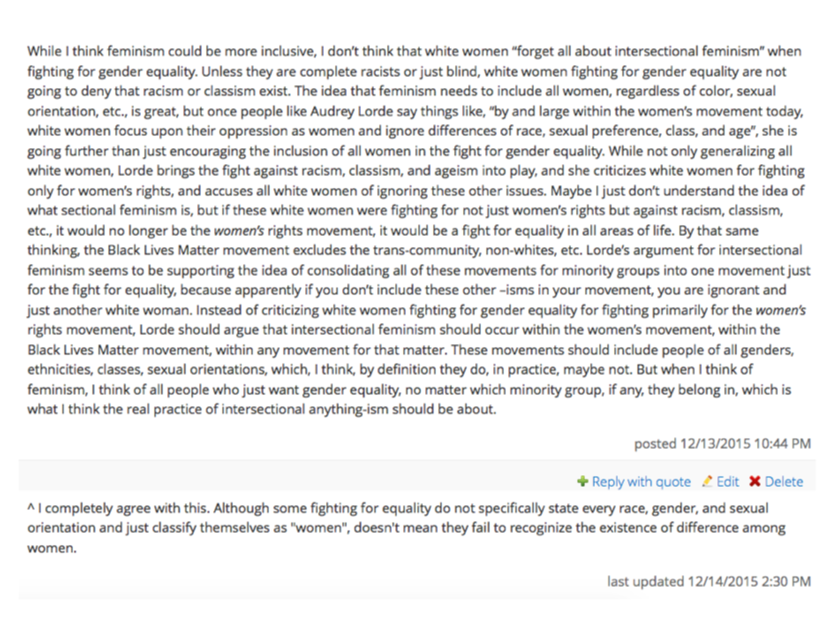
Here are a few sample comments from different threads on the “Intersectional Feminism” page:

In class, we talk explicitly about what makes a good comment and how to disagree with someone in a respectful, intelligent way, rather than devolving into the vitriol so often seen on public websites and social media.  These online posts are a particularly excellent opportunity for quieter students to make their voices heard; the longer comment above was from a student who barely spoke aloud all semester!

As you can see, the VLE has revolutionized my teaching.  At the same time, it has given me the gift of having additional time to sit with my students and talk about books.